Review Comments (0) Screenshots (9) Questions & Answers (0) Votes (2) Awards (21) Wiki  
(2)
WnSoft
7.0
www.wnsoft.com
Shareware
$75.00  Purchase
1 302 people
Download PicturesToExe

11.98 MBDownloaded 749 times

This software was checked for viruses and was found to contain no viruses.
Click here to see antivirus report.
 

Review

This is official description

PicturesToExe is a utility that allows you to create a photo album, slide show, presentation or screen saver from your digital photos with ease. The program creates an .exe file, which is handy for sending it by e-mail or recording on CDs. This program also enables you to create HD videos, DVD-Video disc, video for iPhone, AVI files. In addition, you can publish your resulting clips on YouTube and Vimeo.
 
The following review written by one of the Software Informer contributors applies to version 5.6

PicturesToExe is a utility that allows you to create a photo album, slide show, presentation or screen saver from your digital photos with ease. This program is easy to use and doesn’t require special knowledge. The program creates an .exe file, which is handy for sending it by e-mail or recording on CDs. This program also enables you to create HD videos, DVD-Video disc, video for iPhone, AVI files. In addition, you can publish your resulting clips on YouTube and Vimeo.

Moreover, PicturesToExe comes with a wide range of effects, text labels and buttons, objects and animations. The program has a lot of settings, including exclusive cinematographic transition effects between slides. In addition, you can add text or audio comments (wav, mp3, wma) to every slide and music (mp3, wma, wav, midi) to a whole presentation. Besides, there is a music synchronization option. You can create templates from your slide shows and save them for further use. PicturesToExe contains the VideoBuilder program that will allow you to burn your slide shows on DVDs, which can be played on any player. Also you can design menus for your DVDs.
  • Easy to use.
  • A wide range of effects.
  • Allows to add music.
  • Built-in VideoBuilder.
  • Not free.

Reviewed by: Julia Galygo

Reviewer rating:

Reviewed: 2 years ago

What's new in version 7.0

A full list of new features and changes:
+ Embedding of video clips to slideshow:
> Add video file to the Slide list or as an object in the "Objects and animation editor".
> Instant preview and playback in real time.
> Apply any effects for video objects (3D transformations, Masks, Pan/Zoom/Rotate, Shadow, etc).
+ Unsharp Mask (Project options | Screen tab). This feature dramatically increases sharpness of picture. PicturesToExe adds unsharp mask for entire screen in real-time, even for slides with animation.
+ New Navigation Bar in Slideshows. With a slider control for rewinding and sound volume control.
- Slide list displays times of slides and duration of transition effects.
+ Improved view of the main window of PicturesToExe.
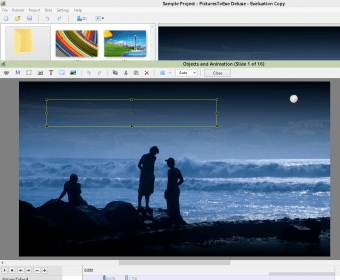
+ Improvements in the Objects and animation editor:
> Added "Sharper/Smoother" parameter for Image, Text and Button objects.
+ Improvements in VideoBuilder:
> Improved quality (sharpness) of DVD picture. > Improved stability of VideoBuilder and compatibility with DVD drives.
+ Added "Offset" parameter for sound comments of slides. This allows delay start of an audio clip.
+ Added "File Info" window (Ctrl+I) for a selected media file in a popup menu of File list, Slide list and in the Objects & Animation editor.
+ File list now displays audio files. You can drag audio files and drop to the Slide list. Project options window will appear with added music files.
+ Mask object can use color 32-bit PNG image file with alpha channel for special visual effects.
+ Insert Blank Slide function available in the timeline mode now.
+ Copy/Paste functions available in the timeline mode now.
+ Added a choice of aspect ratio for New project function (Main menu | New).
+ PicturesToExe shows a progress bar during creating of executable files.
+ The program keeps settings in a profile of current user now.
+ To switch between Slide list and Timeline press F6 hot key.
+ PicturesToExe can work now under limited user account (not administrator).
+ A list of recent projects in the main menu highlights the currently opened project.
+ You can enter another license key for PicturesToExe or VideoBuilder. Run PicturesToExe, see the main menu | Help sub-menu.
+ Double-click to MiniPlayer (in the main window) switches between windowed and fullscreen mode of MiniPlayer.
+ Now it possible select several slides and type one text comment for these slides in the main window.
+ Improvents in the Main tab of Project options.
+ The program displays progress on video encoding and creating executable file on taskbar in Windows 7.
+ Changed list of transition effects suggested by default.
+ Improved message window for not saved project ("Save", "Don't Save", "Cancel" instead of "Yes", "No", "Cancel").
+ Replacement of a main image/video file will update related object name (if user didn't change object name manually)
! "Hold Time Points" option moved from the main window into the main menu | View | Advanced.
! Advanced tab renamed to Control tab in Project options.
! Removed 10 slide limit in trial version of PicturesToExe.
A list of bug-fixes:
* Fixed issue (v5.6.0-v.6.5.7) when "HD video for PC and Mac" and "YouTube/FaceBook" output didn't work on some PCs.
* Fixed issue (all versions) when after an installation a window of PicturesToExe appears behind a window of Windows Explorer.
* Fixed visual bug (v6.5.0-6.5.8) with replacing of an image to animated GIF image in the main window of PicturesToExe in some cases.
* Fixed issue (v5.6.0-v6.5) with rewinding to last slide when paused.
* Fixed bug (v6.0-6.5) when a slideshow with startup window and password protection asks for the password twice.
* Fixed issue (v5.0-6.5) with color dialog window with manual typing of new values.

What's new in version 5.6

Export of HD Video.
Publishing on YouTube and Vimeo.
Video output for iPhone and iPod.
New Transition Effects in 3D.
Mask Effect.
"Run Slideshow with Return" command.
Color outside Slide Area.
Report a wrong version Report a wrong program title Suggest a correction

Screenshots

Main Window Main Window Welcome screen Welcome screen Welcome screen 2 Welcome screen 2 Add slides to the list Add slides to the list
All 9 screenshots

Latest comments


There are no comments, be the first one!
Add new comment

E-mail Address:

Password:

Register now »

Forgot password?

Sign in with:
.pte PicturesToExe Project
Download Software Informer Client
Copyright © 2012, Informer Technologies, Inc. About| Privacy and terms| Help| Feedback & Support| Partners program